Google Antigravity vs Cursor used to be a simple comparison: two AI code editors, one from Google and one from a startup. In 2026 it isn't that simple any more. Google has turned Antigravity into a whole platform, with a standalone agent app, a CLI and extensions for other editors. Cursor has been bought by SpaceX and now ships its own Grok models next to Claude, GPT and Gemini.
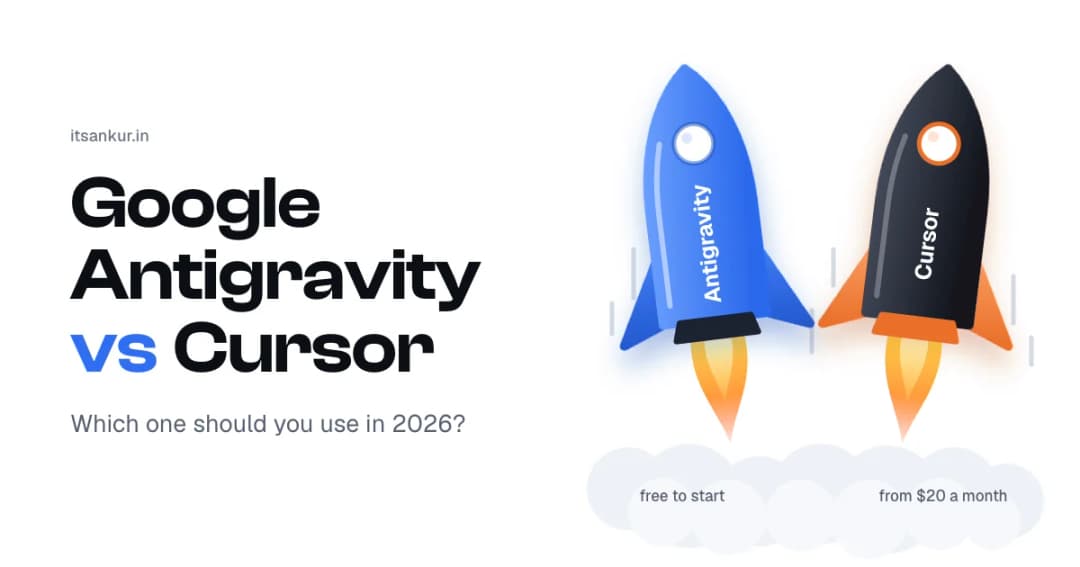
So I went through both products' pricing pages, docs and changelogs on October 8, 2026 to see where they stand today. The screenshots in this post are from that day. I'll give you the short answer first, then the details behind it.
Google Antigravity vs Cursor at a glance
Before the details, here's the whole comparison in one table. Every row is explained further down.
| Google Antigravity | Cursor | |
|---|---|---|
| Made by | Anysphere, part of SpaceX since August 2026 | |
| What it is | An agent platform: desktop app, CLI, IDE, editor extensions and an SDK | A code editor built around an agent, plus a CLI and cloud agents |
| Free plan | Yes, with agents and weekly limits | Yes (Hobby), with limited Agent requests |
| First paid plan | Google AI Pro, $20/month | Pro, $20/month ($16 billed yearly) |
| Heavy-use plans | Google AI Ultra, $100 or $200/month | Pro Plus $60, Ultra $200 |
| Own models | Gemini 3.8 Flash, Gemini 3.1 Pro | Grok 4.7, Composer 2.5 |
| Other models | Claude Sonnet 5.5 and Opus 5.5 on paid plans | Claude, GPT-5.6, Gemini and more |
| Where agents run | On your own machine | On your machine or in Cursor's cloud |
| Works in other editors | Extensions for VS Code, Visual Studio, Zed, JetBrains and Xcode | JetBrains and Xcode integrations |
| Team plan | From $30 per seat, through Google Cloud | $40 per user |
Figures checked on October 8, 2026. Both companies change plans often, so check the official pages before you buy.
What is Google Antigravity?
Google Antigravity is Google's platform for building software with AI agents. Google's own description is "our agentic development platform", and the word that matters there is platform, because Antigravity is no longer one app.
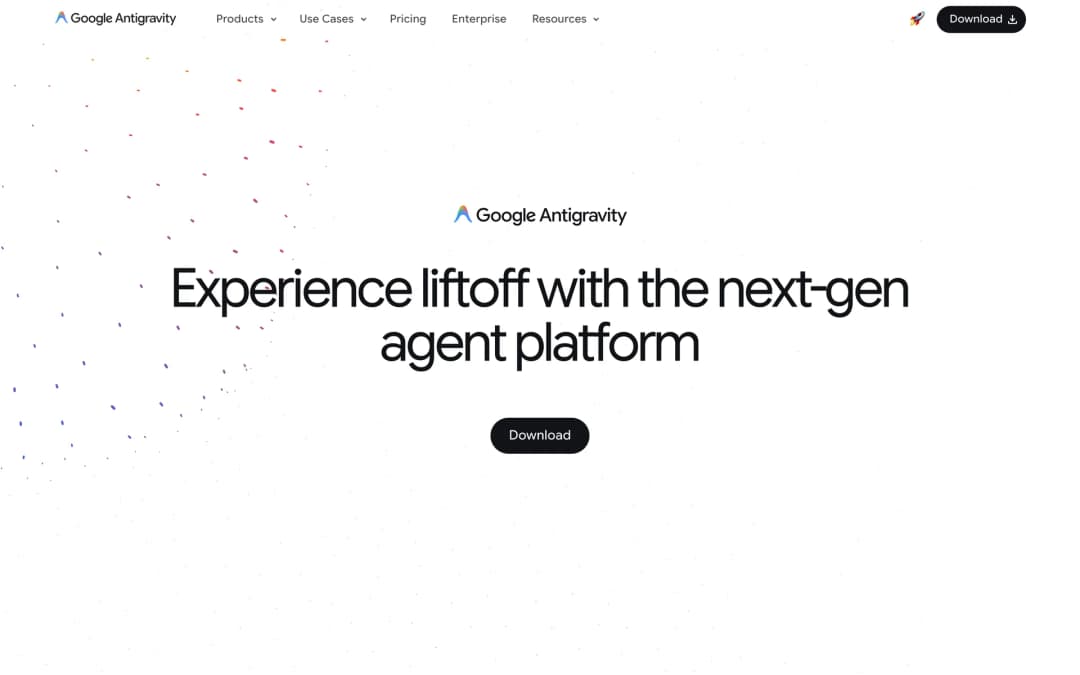
It started in November 2025 as the Antigravity IDE, a code editor with an agent inside. Then on May 19, 2026, Google launched Antigravity 2.0, a separate desktop app with no editor in it at all (Google Antigravity blog). Google calls it "your command center to manage multiple local agents in parallel". Today the platform has five parts:
- Antigravity 2.0: the desktop app where you start agents, watch them work and review what they made.
- Antigravity CLI: the same agents in your terminal.
- Antigravity IDE: the original editor, with agents and Tab autocomplete.
- IDE extensions: Antigravity inside VS Code, Visual Studio, Zed, JetBrains and Xcode.
- Antigravity SDK: for building your own agents in Python.
Google ships updates quickly. The latest version when I checked was 2.21.1, released on October 7, 2026 (changelog).
What is Cursor?
Cursor is a code editor built around an AI agent. Its homepage now describes it as "your coding agent for building ambitious software", which tells you where the company's attention has moved: from autocomplete to agents that do whole tasks.
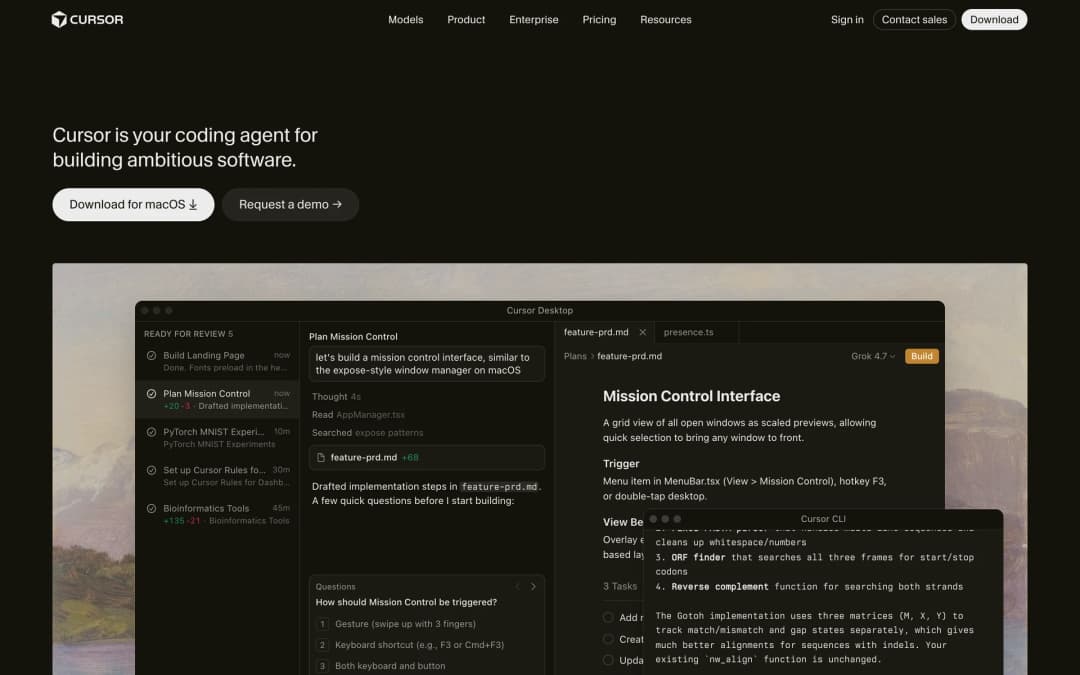
The editor is still the centre. You open the Agent with Cmd+I, give it a task, and review the diff when it finishes. Around the editor, Cursor now has a CLI, cloud agents that run in their own virtual machines, Bugbot for code review, and Grok Bot, which gives you AI teammates that work on a cloud computer of their own (Cursor docs).
The biggest change this year is ownership. On August 14, 2026, Cursor announced that it "has officially been acquired by SpaceX" (Cursor blog). The practical effect for you is in the model list: Cursor's own models are now Grok 4.7, Grok 4.6, Grok 4.5 and Composer 2.5, and they get a larger share of your included usage than models from other companies.
Google Antigravity vs Cursor: head-to-head
Now that you know what each one is, let's compare them on the six things that decide this for most people: price, models, agents, the editor, usage limits and team plans. Each one ends with a winner.
1. Price and free plans
Both tools have a free plan and a $20 plan. The difference is in how much the free plan lets you do.
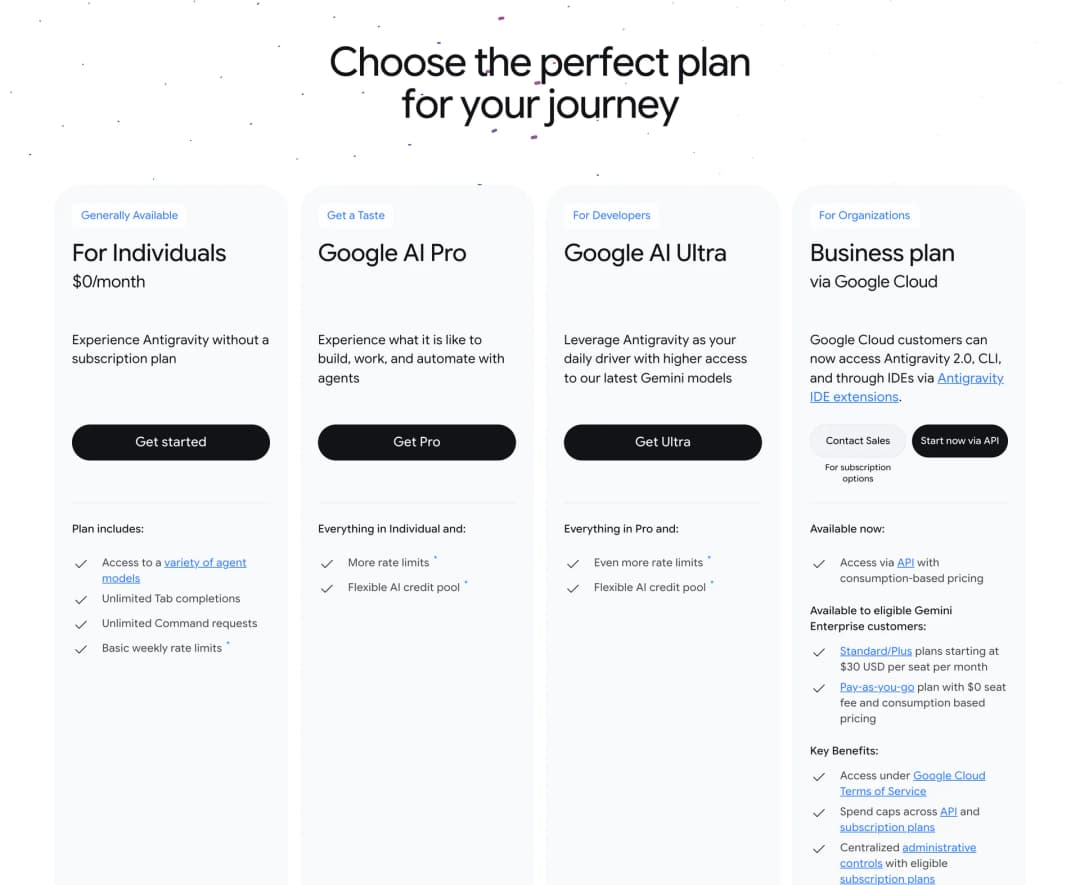
Google Antigravity is free for individuals. The $0 plan includes access to a variety of agent models, unlimited Tab completions, unlimited Command requests and "basic weekly rate limits". To raise the limits you subscribe to a Google AI plan: Pro at $20 a month, or Ultra at $100 or $200 a month. Google says the $100 plan gives 5 times the Pro limit and the $200 plan gives 20 times (Google Antigravity blog).
Cursor has a free Hobby plan with no credit card needed, but it only includes "limited Agent requests". Pro is $20 a month, or $16 a month if you pay yearly. Above that are Pro Plus at $60 and Ultra at $200 (Cursor docs).
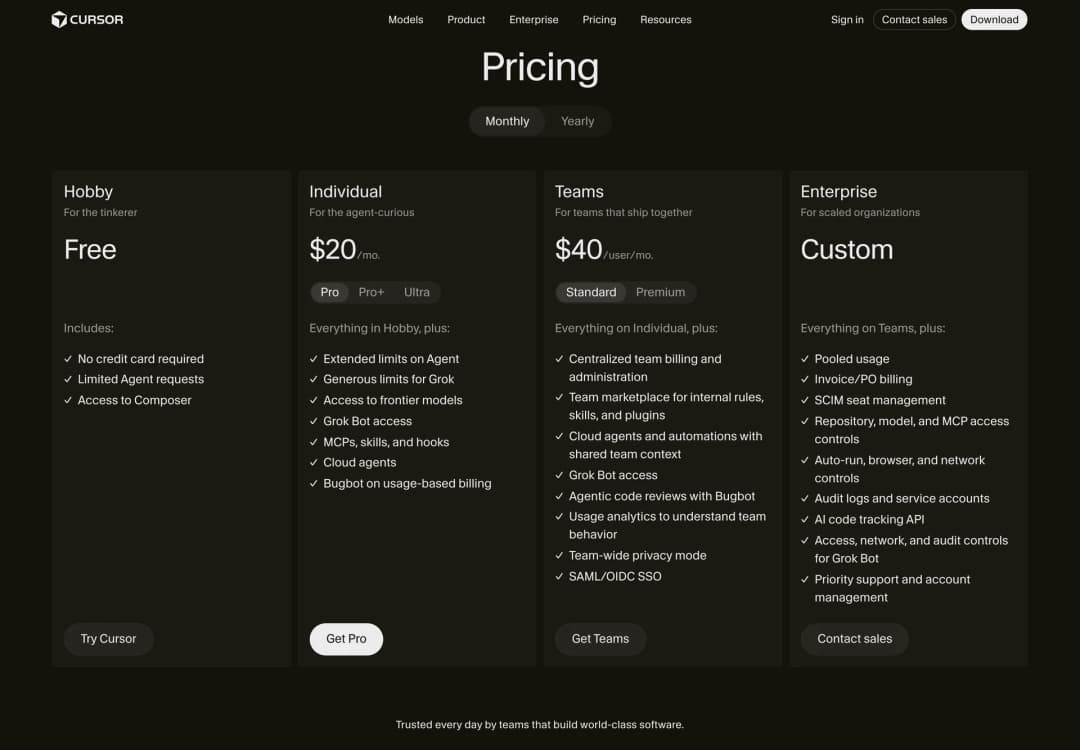
One detail on Cursor's own pricing page is easy to miss. Cursor recommends Pro Plus, not Pro, for people who use the agent every day, and its docs say daily agent users typically spend $60 to $100 a month in total. So plan for more than $20 if the agent is going to be your main way of working.
Winner: Google Antigravity. Its free plan gives you more room, with a weekly agent quota and unlimited Tab completions against Cursor's limited Agent requests, and the paid plans start at the same $20.
2. AI models
Price only matters if you get the models you want, and here the two tools go in opposite directions. Antigravity is built around Google's models. Cursor tries to offer everyone's.
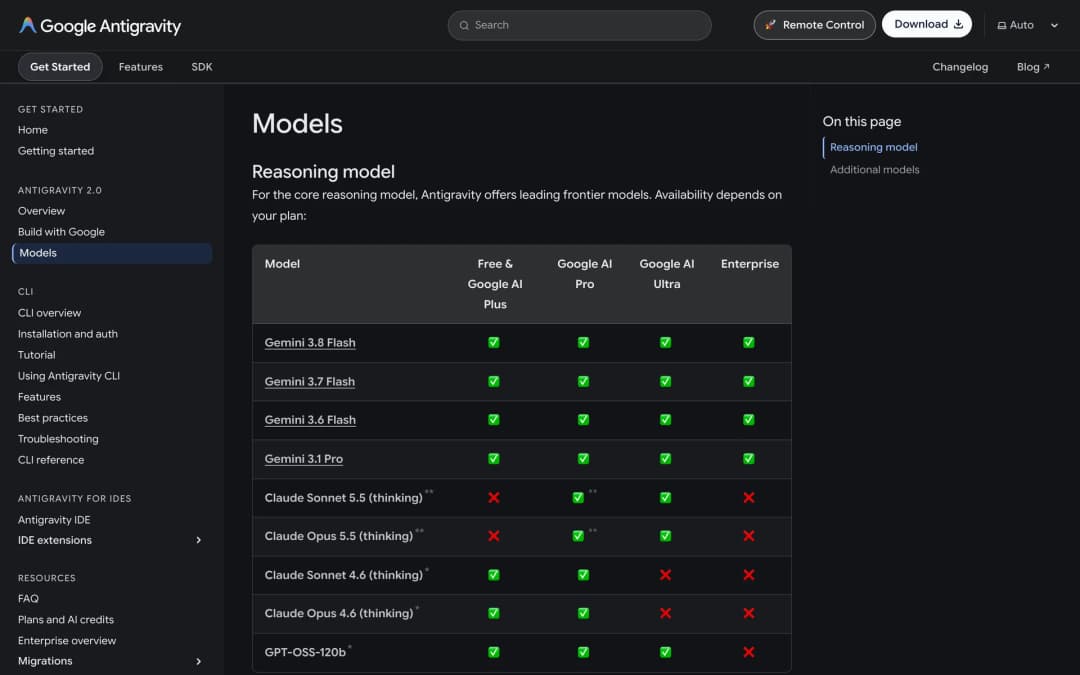
Google Antigravity gives every plan, including the free one, the Gemini models: Gemini 3.8 Flash, 3.7 Flash, 3.6 Flash and Gemini 3.1 Pro. The newest Claude models, Sonnet 5.5 and Opus 5.5, are available on Google AI Pro (not on trial subscriptions) and Ultra. The free plan still has the older Claude Sonnet 4.6 and Opus 4.6 for now, but those and GPT-OSS-120b are being removed on November 2, 2026 (Antigravity docs). After that date, using Claude in Antigravity means a paid plan. Antigravity also doesn't let you bring your own API key.
Cursor splits its models into two pools. The Cursor Models pool covers Grok 4.7, Grok 4.6, Grok 4.5 and Composer 2.5, and it comes with "significantly more included usage". The Other Models pool covers everything else at the model's API price: Claude Sonnet 5.5, Opus 5.5, Fable 5.1 and Haiku 5.5, GPT-5.6 Sol, Terra and Luna, Gemini 3.1 Pro and 3.8 Flash, and Muse Spark 1.3.
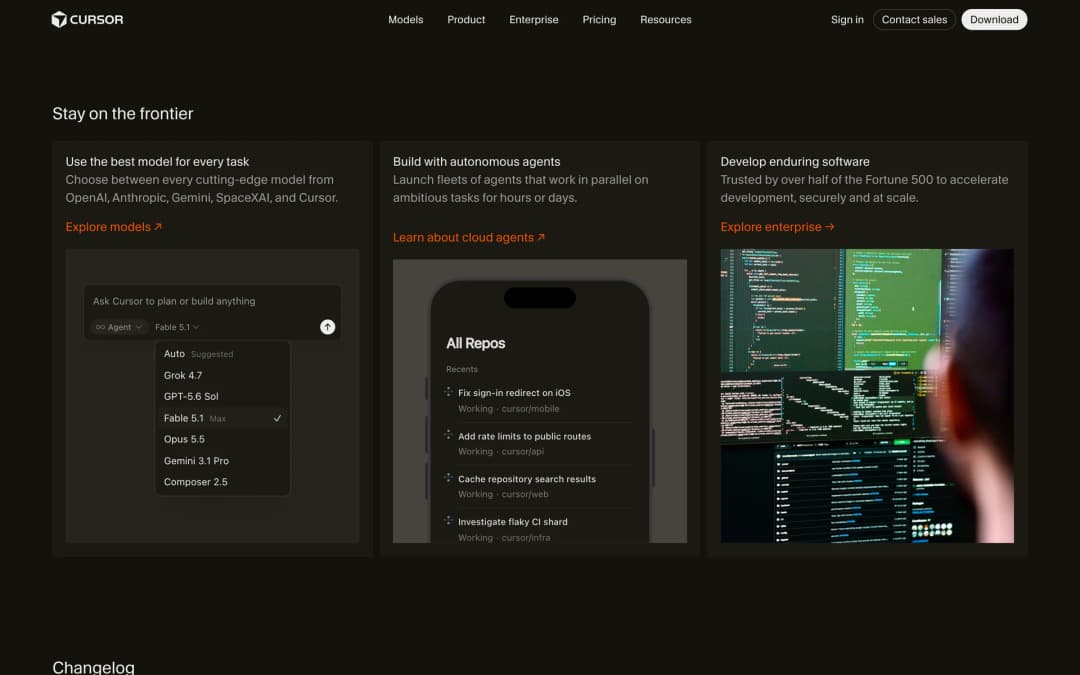
Winner: Cursor. It has Claude, GPT, Gemini and Grok in one picker. Antigravity is the better deal only if Gemini is the model you want anyway.
3. Agents
Both tools now sell themselves on agents more than on autocomplete. They differ in where those agents run.
Google Antigravity runs agents on your own machine. In Antigravity 2.0 you can run several at once, and an agent can create subagents for parts of a task. You group conversations into Projects that span more than one folder, schedule recurring work with Automations, and review what the agent produced as artifacts: plans, code diffs, diagrams and browser recordings. Remote Control lets you check on those sessions from a web browser when you're away from your desk (Antigravity docs). I couldn't find agents that run in Google's cloud in the docs. When Google announced 2.0, it listed "cloud-deployed agents" among the things still to come.
Cursor has local agents too, and it adds Cloud Agents. Each one runs in an isolated virtual machine with your repository cloned, so it keeps working when your laptop is closed, and you can run many in parallel. You can start one from the desktop app, the web, the iOS app, Slack, a GitHub comment or Linear (Cursor docs). In September, Cursor also launched Projects, where a coordinator agent plans a large piece of work and hands the parts to other agents (changelog).
Winner: Cursor, if you want agents working in the cloud and connected to Slack and GitHub. Antigravity, if you want a free control room for agents on your own computer.
4. Editor and autocomplete
This is where the two products have grown apart the most. Cursor is still an editor first. Google now treats the editor as optional.
Cursor keeps everything in one window: the code, the agent in a side pane, Tab completions as you type, and checkpoints that let you undo what an agent changed. If you use a JetBrains IDE or Xcode, Cursor can connect to those as well, on a paid plan.
Google Antigravity still has its own editor, the Antigravity IDE, with Tab features called Supercomplete, Tab-to-Jump and Tab-to-Import. Tab completions are unlimited on every plan, including the free one. But Google's advice now is to use Antigravity 2.0 next to whatever editor you like, and since August 20, 2026, it has had extensions for VS Code, Visual Studio, Zed, JetBrains and Xcode (Google Antigravity blog).
Winner: Cursor, if you want one editor that does everything. Antigravity, if you'd rather keep the editor you have.
5. Usage limits
Every AI coding tool has limits now, so the useful question is what happens when you hit them. The two tools answer it differently.
Google Antigravity makes you wait. On the free plan your quota refreshes weekly. On Google AI Pro it refreshes every five hours until you reach a weekly limit, and Ultra gets the highest limits. When you run out, you either wait for the refresh or, on Pro and Ultra, spend AI credits on extra usage. Google also says these limits "are subject to modification", so they can change (Antigravity docs).
Cursor makes you pay. Each plan includes a set amount of usage every month. When it's gone, you can add on-demand usage at the same API rates or move to a bigger plan, and Cursor says "requests are never downgraded in quality or speed".
Winner: It depends on you. Cursor if you'd rather pay than wait. Antigravity if you'd rather wait than pay.
6. Teams and companies
If you're choosing for a team, the question changes from features to how your company buys software.
Cursor has a self-serve Teams plan at $40 per user a month ($32 billed yearly), with central billing, a team marketplace for shared rules and skills, Bugbot code reviews, usage analytics, team-wide privacy mode and SSO. A Premium seat is $120. Enterprise is custom.
Google Antigravity is sold to organisations through Google Cloud. Eligible Gemini Enterprise customers get plans starting at $30 per seat a month, or a pay-as-you-go plan with no seat fee (Antigravity pricing). One catch: the standalone Antigravity IDE isn't supported for enterprise use. Companies use Antigravity 2.0, the CLI and the editor extensions.
Winner: Cursor for a small team that wants to sign up and start today. Antigravity if your company already runs on Google Cloud.
Google Antigravity vs Cursor pricing in India
I'm writing this from Chandigarh, so I also checked what both cost in rupees. If you're in India, the numbers look quite different from the dollar prices above.
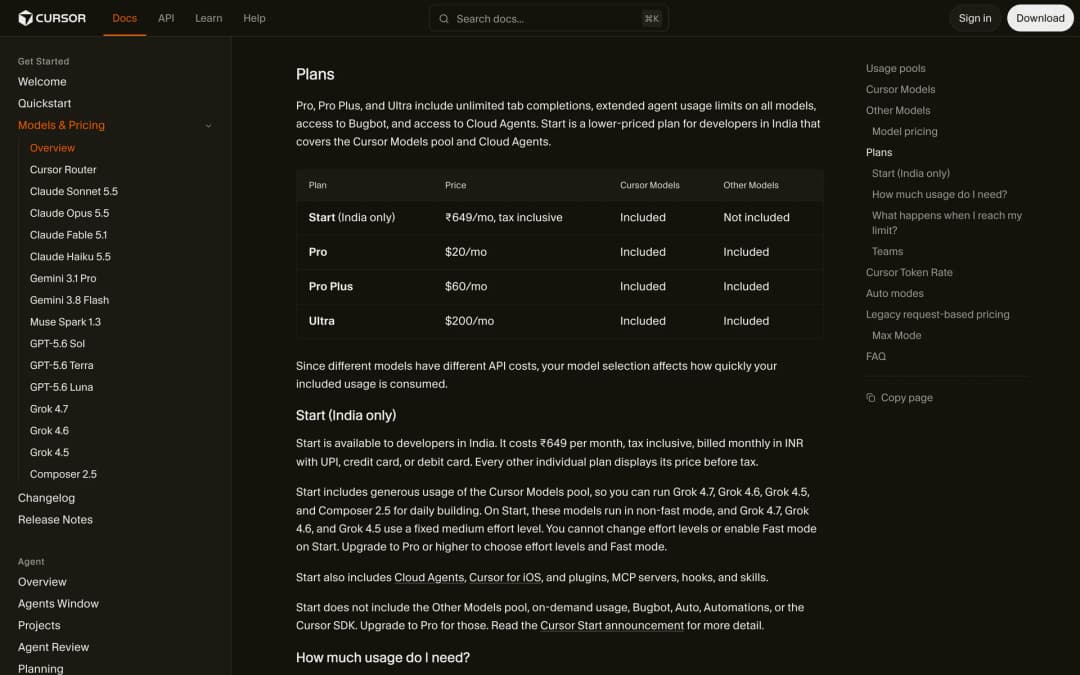
Cursor has a plan it sells only in India, called Start. It costs ₹649 a month, tax included, and you can pay with UPI. Start covers Cursor's own models (Grok 4.7, Grok 4.6, Grok 4.5 and Composer 2.5) and Cloud Agents. It doesn't include Claude, GPT or Gemini models, Bugbot or on-demand usage.
Google lists its AI plans in rupees too: Google AI Plus at ₹399 a month, Pro at ₹1,950 and Ultra from ₹6,500 (Google One). For Antigravity, Plus gets the same models and weekly quota as the free plan, so Pro is the first plan that raises your limits.

So in India the cheapest paid option is Cursor Start at ₹649, as long as Grok and Composer are enough for you. And Antigravity's free plan is still ₹0, which makes it the obvious first thing to try.
Google Antigravity vs Claude Code
A lot of people comparing these two are also looking at Claude Code, so here's how Antigravity sits next to it. Claude Code is Anthropic's coding agent. It runs in the terminal, in VS Code and JetBrains, in a desktop app and on the web.
The first difference is price. Claude Code has no free plan. It's included in every paid Claude plan, which starts with Pro at $20 a month ($17 if you pay yearly), and Max starts at $100 (Claude pricing). Antigravity lets you start for free.
The second is models. Claude Code is built for Claude models. Antigravity defaults to Gemini and also offers Claude Sonnet 5.5 and Opus 5.5 on its paid plans, so you can use Claude inside Antigravity without a Claude subscription.
If you like working in the terminal, the closest match to Claude Code is the Antigravity CLI. I compared those two in Gemini CLI vs Claude Code, which also explains how the Antigravity CLI replaced Gemini CLI.
Google Antigravity vs Codex
Codex is the other name that comes up, especially if you already pay for ChatGPT. It's OpenAI's coding agent, and it comes with ChatGPT plans instead of being sold on its own.
That makes price the easy part. Codex is on ChatGPT Free and the $8 Go plan in a limited form, with GPT-6 Luna in the desktop app. The full version, with the web app, the CLI, the IDE extension and iOS, starts at Plus for $20 a month, and Pro starts at $100 (Codex pricing). Antigravity's free plan is more generous than Codex's free tier, because it includes its full agent features with a weekly limit.
The way you work is the bigger difference. Codex is strongest when you hand off tasks to run in OpenAI's cloud and review the results later. Antigravity's agents run on your own machine. I go deeper on how Codex works in Codex vs Claude Code.
Which should you choose?
By now you probably know which way you're leaning. If you don't, find the row that sounds most like you.
| If you are… | Pick | Why |
|---|---|---|
| A student or hobbyist who doesn't want to pay | Google Antigravity | The free plan includes agents and unlimited Tab completions |
| Someone who wants Claude, GPT, Gemini and Grok in one place | Cursor | The widest model choice of the two |
| Happy with your current editor, such as VS Code or Zed | Google Antigravity | It works as an extension next to your editor |
| Looking for one editor that does everything | Cursor | Agent, Tab and review in a single window |
| Running long tasks you don't want to babysit | Cursor | Cloud agents keep working with your laptop closed |
| On a team that already uses Google Cloud | Google Antigravity | It's sold and governed through Gemini Enterprise |
| On a small team that wants to start today | Cursor | Self-serve Teams plan at $40 per user |
| A developer in India on a tight budget | Antigravity free, then Cursor Start | ₹0 first, then ₹649 a month |
If you still can't decide, read my wider guide to the best AI coding assistants in 2026. It covers seven more tools.
Frequently asked questions
Here are short answers to the common questions about these two tools.
Is Google Antigravity free?
Yes. The individual plan is $0 a month and includes agent models, unlimited Tab completions and a weekly rate limit. Google AI Pro ($20/month) and Ultra ($100 or $200/month) raise the limits.
Is Google Antigravity better than Cursor?
Neither is better for everyone. Antigravity is better if you want a free start and Gemini models. Cursor is better if you want the widest choice of models and agents that run in the cloud.
Can I use Claude in Google Antigravity?
Yes. The newest models, Claude Sonnet 5.5 and Opus 5.5, are on Google AI Pro (not on trial subscriptions) and Ultra. The free plan has the older Claude 4.6 models until November 2, 2026.
Is Cursor owned by SpaceX?
Yes. Cursor announced on August 14, 2026 that it had been acquired by SpaceX. Its own models are now Grok 4.7, Grok 4.6, Grok 4.5 and Composer 2.5.
Is Cursor free?
Partly. The Hobby plan is free and needs no credit card, but it only includes limited Agent requests. Pro is $20 a month.
Does Google Antigravity work with VS Code?
Yes. Since August 2026 there has been an Antigravity extension for VS Code, and also for Visual Studio, Zed, JetBrains and Xcode.
What is Antigravity 2.0?
Antigravity 2.0 is Google's standalone desktop app for managing AI agents, launched on May 19, 2026. It has no code editor inside it. You use it next to your editor, or with the Antigravity CLI.
Which is better for beginners?
Google Antigravity is easier to try, because the free plan includes agents. Cursor is easier to understand if you've used a code editor before, because everything is in one window.
Final verdict
Google Antigravity vs Cursor comes down to what you want to pay for. With Antigravity you pay nothing to start and get Google's models and a control room for agents on your own machine. With Cursor you pay from $20 and get every major model, an editor built around the agent, and agents that run in the cloud.
My advice is to start with Antigravity, because trying it is free. Use it on real work for a week. If you find yourself wanting other models, or wanting agents that keep going after you shut your laptop, take Cursor Pro for a month and compare the two on the same tasks.
Sources
Checked on October 8, 2026. Prices and limits come from the official pages below.
- Google Antigravity, pricing, plans and models – Google
- Introducing Google Antigravity 2.0, Changes to Antigravity plans and Introducing IDE extensions – Google Antigravity blog
- Antigravity changelog, Remote Control and enterprise overview – Google Antigravity docs
- Google AI plans – Google One (India prices)
- Cursor, pricing and models and pricing – Cursor
- Cursor is now a part of SpaceX and changelog – Cursor
- Cloud Agents, Grok Bot and JetBrains integration – Cursor docs
- Claude plans and pricing – Anthropic
- Codex pricing – OpenAI